Configure: Editor
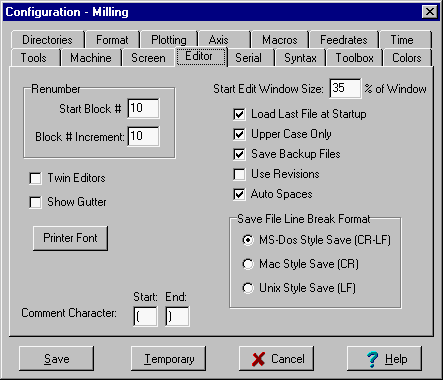
Renumber
This sets the default values that are displayed in the Renumber dialog box.
Start Edit Window Size
This set the edit window size at startup.
EditWindowSize=35 sets the edit window size to 35% of the application window size.
The default size is 20% of the main window.
Load Last File at Startup
If this is checked, Inplot will load the last NC and CAD file it had when it last ended.
Upper Case Only
If this is checked, all characters typed into the editor will be in upper case. This saves the trouble of having to always turn on the Caps Lock key.
Save File Line Break Format
Determines what format to save the text file in.
Normal is MS-Dos style. This will save with Carriage Return and Line Feed at the end of every line.
Mac style will save with Carriage Return at the end of every line.
Unix style will save with Line Feed at the end of every line.
Comment Start End
Lines in the editor that are surrounded by these characters will be interpreted as comments. The default character is '('. If the machine uses a different character to signify the start and end of a comment, you can enter it here. If the control uses one character at the beginning of the comment and nothing at the end of the line, leave the End Comment Char blank. Some functions in Inplot will skip over any line that has a comment character in it, so its best to have no other code on the line except the comment.
Save Backup Files
Enables Inplot to rename the old version of the editor file to “.BAK” extension when it does a Save NC File . See also Config-Directories
Use Revisions
Puts an extension of “.001” on the end of the filename. Every time the file is saved, the number in the extension is incremented. So all the past backup files will be saved.
Twin Editors
When this is checked, Inplot shows two side by side editors. Twin editors can be used to compare programs. Clicking on one of the two editors will activate it for plotting and other utilities. You can go back and forth between the two by clicking on it. File is loaded into the first editor the normal way. A file is loaded into the second editor by right-click on second editor and choosing File - "Load Text". Not to be confused with Twin Turrets in the Machine tab. Don't have both turned on at the same time. See also: File Compare.
Show Gutter
When this is checked, Inplot starts up with showing the Gutter in the editor. Turn the Gutter on and off with the right mouse editor popup menu.
Auto Spaces
As you type character addresses in the Editor, this will add and remove spaces to make sure there is one space between each address on the line. This only affects the line you are typing on - to do the whole file at once, use the Add Spaces Utility.
_________________________________________________________________
Copyright © 2020 i-Logic Software